Buying your first cryptocurrency feels like a badge of honor. You stare at the little numbers on your screen, envision yourself buying an island someday, and proudly tell your friends you are an investor now. Five minutes later, the paranoia creeps in. You realize there is no bank manager to yell at if things go missing, no customer helpline with soothing jazz music, and definitely no “undo transaction” button. You are officially your own bank.
Before panic turns into sleepless nights, the solution boils down to one fundamental decision: choosing between a hot wallet and a cold wallet. Let’s break down what they actually are, how they work, and which one will keep your digital money out of reach of Internet gremlins.
The Big Secret: Your Wallet Doesn’t Actually Hold Coins
First things first, we need to bust a massive myth. When people say they have a “crypto wallet,” it sounds like a fancy digital purse where Bitcoins rattle around like loose change. That is not how it works at all.
All your coins live directly on the blockchain, which is just a giant public ledger that everyone can see. What your wallet actually stores are your private keys. Think of the blockchain as a row of transparent glass lockers at a gym. Everyone can see what is inside locker #42, but only the person holding the physical key can open the door and take anything out. Your private key is that physical key. If someone copies your key, they take your stuff. If you lose your key, the coins sit locked in that glass box forever, mocking you for eternity.
The entire debate between hot and cold wallets simply comes down to one question: Where do you keep that key?
Hot Wallets: The Fast and Loose Daily Drivers
A hot wallet is any wallet connected to the internet. If it lives on your phone as an app, sits as an extension inside your web browser, or runs as software on your laptop, it is a hot wallet.
Why People Love Hot Wallets
Hot wallets are designed for convenience. If you want to buy a token at 2:00 AM because of a random tip on Reddit, a hot wallet lets you do that in three clicks. They are usually completely free to download, simple to set up, and let you interact with decentralized apps, NFT marketplaces, and trading platforms effortlessly.
-
Zero upfront cost: You do not have to buy hardware; just download an app like MetaMask, Phantom, or Trust Wallet.
-
Instant access: Your funds are available anywhere you take your phone.
-
Smooth user experience: Most modern hot wallets have sleek, colorful interfaces that feel just like your normal mobile banking app.
The Downside: Living Dangerously Online
Because a hot wallet lives on a connected device, it shares the vulnerabilities of that device. If you accidentally download malware, click a sketchy link disguised as an airdrop, or leave your laptop open on public Wi-Fi, your private keys could be exposed. Keeping your entire life savings in a hot wallet is the digital equivalent of walking through a busy subway station with a roll of $100 bills sticking halfway out of your back pocket. It works fine right up until it doesn’t.
Cold Wallets: The Digital Fort Knox
A cold wallet is a device or method that stores your private keys completely offline, isolated from the internet. The most common variety is a hardware wallet—a tiny gadget that looks suspiciously like a thumb drive from 2008.
How Cold Storage Actually Works
When you plug a hardware wallet (like a Ledger, Trezor, or Keystone) into a computer, it doesn’t just spill its keys out onto your desktop. Instead, the transaction data is sent into the device. The device signs the transaction internally inside its secure chip and spits only the approved signature back out to the computer.
Even if your computer is crawling with viruses, the hacker cannot grab your keys because the keys never leave the hardware device. Unless someone physically presses the buttons on the wallet in front of them, no money moves.
The Good and the Annoying
Cold wallets offer peerless security. They are the gold standard for long-term holding (or “HODLing,” if you speak the lingo).
-
Total immunity to remote hacks: An attacker in another country cannot hack a piece of metal sitting in your sock drawer.
-
PIN protection: Even if a thief steals the physical device, it wipes itself after a few incorrect PIN attempts.
-
The drawback—convenience: Want to quickly sell during a flash crash? Better find your device, hunt down the USB cable, plug it in, and confirm the transaction by clicking tiny physical buttons. It is deliberately slow. Also, good hardware wallets cost money—usually anywhere from $60 to $200.
Hot Wallets vs. Cold Wallets: Head-to-Head Comparison
To see how they stack up side-by-side, look at how their everyday characteristics match your trading habits:
| Feature | Hot Wallet (Software) | Cold Wallet (Hardware) |
| Internet Connection | Always connected | Completely offline |
| Setup Cost | Free | $60 to $200+ |
| Ease of Use | Fast, convenient, app-based | Clunky, requires physical device |
| Risk of Online Hacks | High (phishing, malware, exploits) | Virtually zero |
| Physical Loss Risk | Low (backed up via cloud/app) | Moderate (can be misplaced or damaged) |
| Best For | Active trading, small daily balances | Long-term savings, large investments |
The Common Denominator: The Seed Phrase
Whether you choose hot or cold, both will hand you a 12-to-24-word recovery phrase (often called a seed phrase) during setup.
This string of words represents your master key translated into human language. If your phone falls into a lake, or your hardware wallet gets chewed up by your dog, you can buy a replacement device, type in those words, and your balance reappears.
Treat these words like crown jewels:
-
Never type them into a website or email. Legitimate support staff will never ask for them.
-
Never take a screenshot. Photos back up to the cloud automatically, turning offline security into online vulnerability.
-
Write them on paper or stamp them on steel. Store that backup somewhere safe from fire, floods, and over-enthusiastic housemates cleaning up scrap paper.
The Smart Play: Use Both Like a Pro
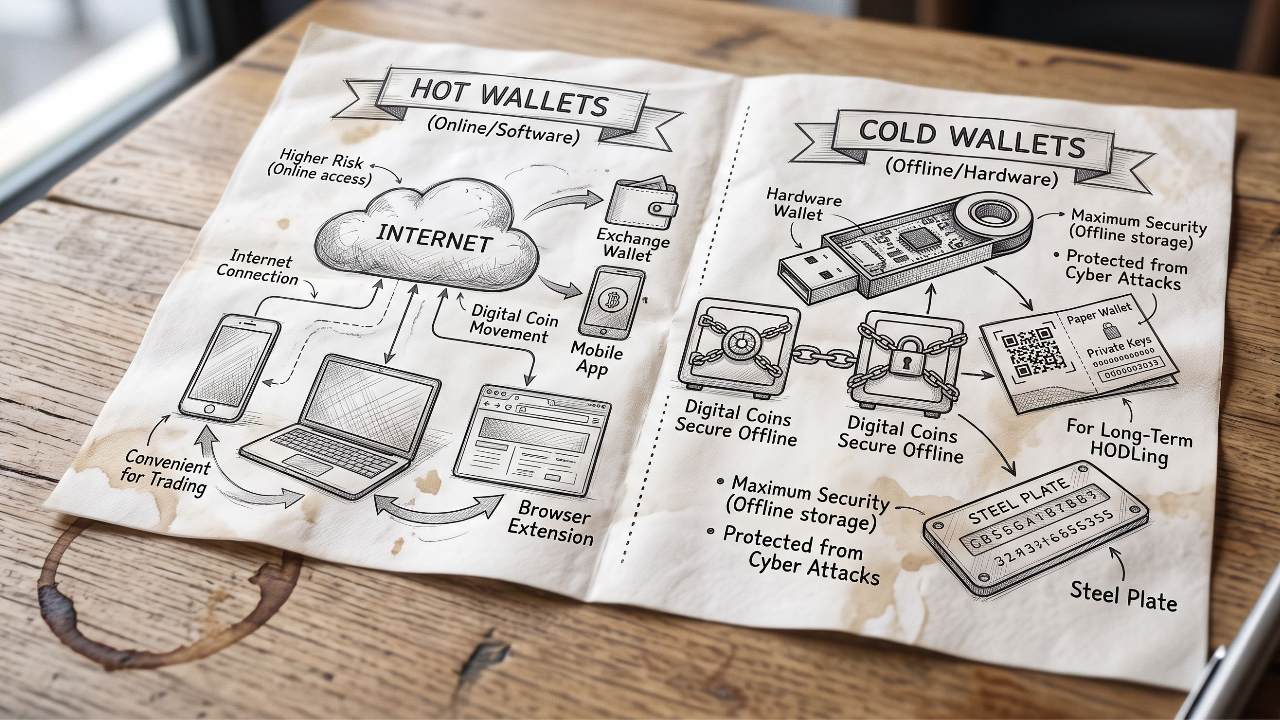
You do not have to pick one camp and stay there. In fact, most experienced crypto owners use a hybrid approach that mirrors regular banking:
-
Use your Cold Wallet as your Savings Account: Move 80% to 90% of your holdings here. Lock it in a drawer or safe, check on it occasionally, and let it sit undisturbed.
-
Use your Hot Wallet as your Checking Account: Keep only what you plan to spend, trade, or experiment with this month. If lightning strikes and your hot wallet gets drained, it hurts, but your life savings remain untouched.
Treat your crypto like cash: keep walking-around money in your pocket, and stash the rest in the vault.